StormClip blog
Field guides for streamers who want their best moments to reach people after the broadcast.
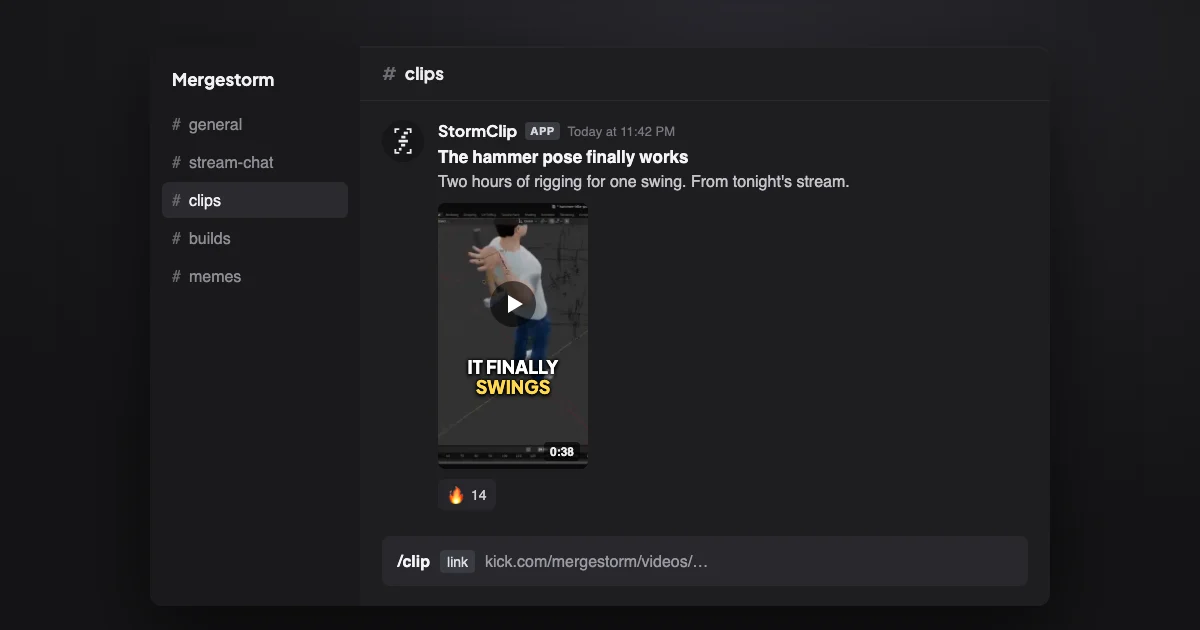
How to post your stream clips to Discord automatically
Connect your Discord server to StormClip and the best clips from each stream land in your clips channel by themselves. Anyone in the server with a linked StormClip account can clip a VOD with /clip.
Read the guideMore guides

How to grow a small stream between broadcasts
Give new viewers a reason to join your next stream. Choose one moment, turn it into a short, and measure whether viewers come back when you go live.

How to clip a Kick stream while you are live
Sign in with Kick and StormClip clips every stream you start, while you are still live. Kick streams and VODs cost fewer credits than a YouTube link.

How to grow a GTA 6 stream with short clips
Turn a GTA 6 stream into spoiler-conscious shorts. Pick a challenge, keep the reaction, and give viewers a reason to join your next live session.

Turn a long livestream into shorts
How to get a week of captioned shorts out of a 3, 5 or 8 hour stream with StormClip, without scrubbing through the VOD yourself.

Shorts from coding and build in public streams
Turn a coding stream into captioned shorts for X, LinkedIn, Bluesky, YouTube Shorts and more. StormClip finds the explanations and the wins in the transcript.

Podcast and interview clips with captions
Cut a podcast episode or interview into captioned vertical clips, each with a title, caption and hashtags for nine platforms. How it works with StormClip.

A clipping workflow for people who clip other creators
If you are paid to clip someone else's streams, StormClip finds the moments, renders per platform and writes the copy, so you spend your time choosing.

One stream, nine platforms, one week of shorts
Follow one moment from a stream recording to a captioned short, a platform-specific export and a posting schedule you can actually keep.

How to clip a livestream into shorts people can follow
A practical edit checklist for turning a long stream into vertical clips. Find the setup and payoff, check the phone crop, then write the first line of the post.