Shorts from coding and build in public streams
Turn a coding stream into captioned shorts for X, LinkedIn, Bluesky, YouTube Shorts and more. StormClip finds the explanations and the wins in the transcript.


A coding stream is mostly quiet typing with a few minutes that matter: the bug finally found, the design choice explained, the demo that works on the first try. Those minutes are what bring people to the next stream. StormClip finds them from what you said, which is where a coding stream keeps its good parts.
Make a bug report into a short
Record the broken behavior first. Keep the line where you explain your hypothesis, then jump to the same action after the fix. A stranger can now see the difference, even if they cannot read the code. Check the crop for private terminals, tokens and customer names before you export.
The workflow
- Paste the stream. A YouTube link, or the OBS recording.
- Tell it what you built. Context such as "building a merge queue in TypeScript, today was the retry logic" helps it tell a real insight from small talk. You can also say what to skip: "no clips of me waiting for CI".
- Review the picks. Each one is a captioned vertical short. Technical words get mangled by every transcriber, so fix them by name: "change Hiku to Haiku". The captions render again with the word corrected.
- Choose how the screen fits. A wide editor in a tall frame is a choice: fit the whole screen over a blurred fill so the code stays readable, or crop in on the part that matters.
- Take the copy for where developers are. StormClip writes a different post for each platform: a first person hook line with no hashtags for X, a one line lesson and why it matters for LinkedIn, something plain and specific for Bluesky.
- Post. X also gets a wide 16:9 render, since a screen recording reads better that way in its timeline.
Let your agent do it
If you already work with a coding agent, it can run StormClip for you. StormClip has an MCP server at https://stormclip.app/v1/mcp, a stormclip CLI and an HTTP API, all on one API key from the dashboard. After a stream you can say "clip yesterday's stream, three clips about the retry logic, and give me the X files", and the agent starts the job, reads the transcript, picks, and downloads the files.
The tools your agent gets over MCP are the same ones the clip agent in the dashboard uses, so anything you can ask for there, it can do.
What it costs
1 credit is 1 minute of stream. Kick and Twitch streams and VODs, and uploads are 50% off: 1 credit is 2 minutes. Monthly is $29 per month for 1,800 credits. If you stream once a week, a pack of 360 credits for $9 may be all you need, and pack credits do not expire.
What to expect
If your stream has a facecam in a corner with a visible frame around it, StormClip usually finds it and stacks it over the screen, so the code stays readable on a phone. A facecam without a clear edge may not be found, and the clip then keeps the whole screen. It does not follow a face that moves around the frame, and it will not add B-roll. You get a clean, captioned clip of the moment and the words to post it with. For the exact frame, safe zone and copy limits it applies, see the X and LinkedIn specs.
Show a retry bug in a way a phone camera can read
Imagine a save button that creates two items when a request times out and retries. Reproduce it using a local demo with fictional records. Start on a short list, press Save once, and let viewers see two new rows appear. Say what the user expected. That one action explains the bug more quickly than a screen full of logs.
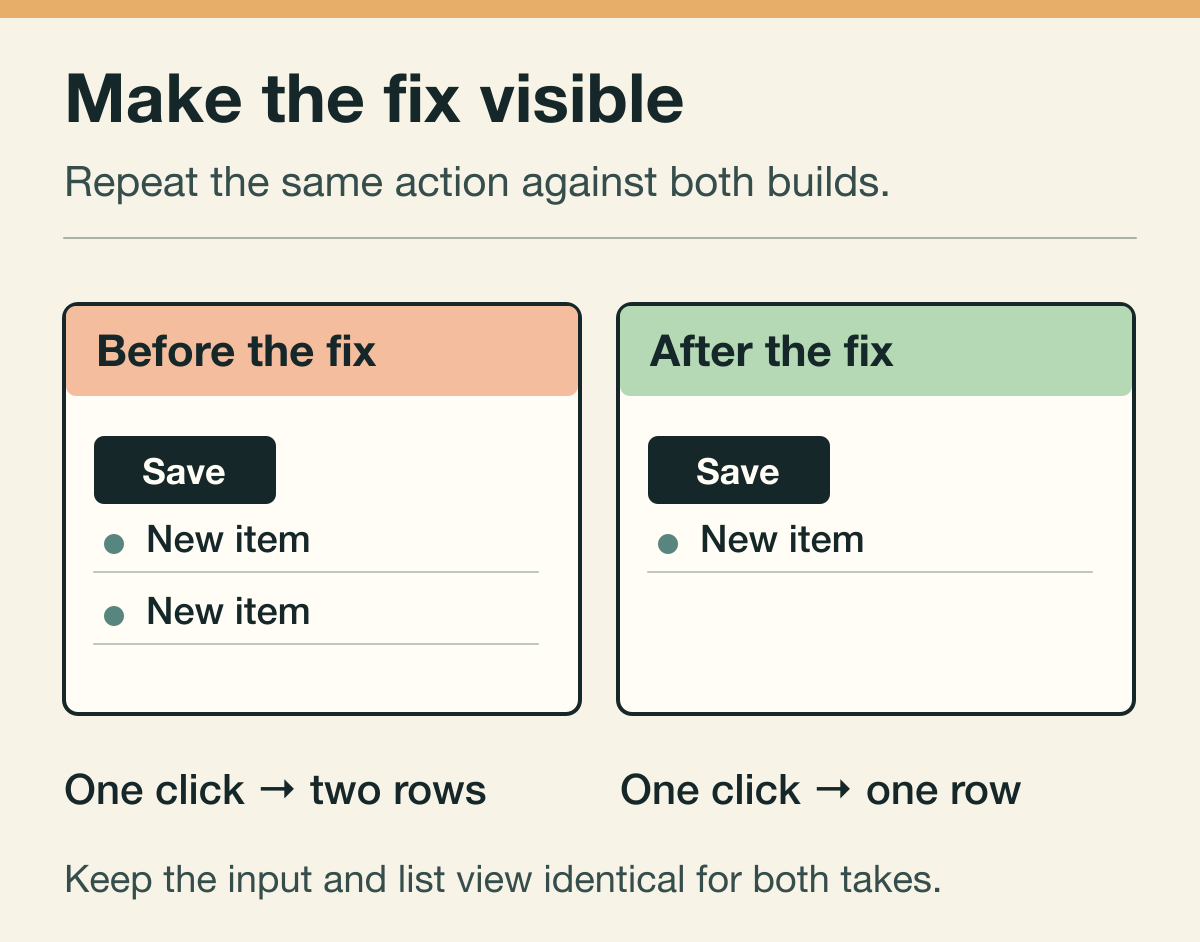
For the middle of the clip, choose the smallest piece of evidence that explains the fix. You might show one request identifier reused on the retry and explain that the second request now refers to the same operation. Zoom your recording to a readable size before the demonstration. A vertical crop of an entire desktop often preserves the shape of the code while losing every readable word.
End by repeating the same input against the fixed build. One click, one new row. Keep the original timer or spinner visible on both attempts so the audience can compare like with like. If the successful example uses a different input, record it again. A viewer should be able to tell which change produced the result.
Caption the code by meaning
Listen for terms that sound similar but mean different things. For this example, a caption that turns “retry” into “rewrite” changes the diagnosis. Spell the identifier correctly the first time it appears and use plain language in the sentence that follows. Before sharing, pause on the terminal and check the title bar, prompt and browser tabs for private names. Export the version that shows the behavior most clearly, then use the post text to name the technical concept for people who want to look it up.
Browse all guides →