How to grow a GTA 6 stream with short clips
Turn a GTA 6 stream into spoiler-conscious shorts. Pick a challenge, keep the reaction, and give viewers a reason to join your next live session.


A stranger scrolling past a driving clip has no idea why you took the wrong turn. Give them a rule they can understand in one sentence. “Chat picks the route, and I have to follow it” makes a quiet drive into a story with a decision and a consequence.
Plan three moments before you go live
- The challenge. Say what counts as a win. Keep a timestamp when you make the promise so the clip has a beginning.
- The reversal. When a plan goes wrong, leave the camera running through your reaction. The laugh after a missed turn can carry more of your personality than the driving.
- The return invitation. Let chat pick the next route, then say when you will try it. Someone who discovers the short a day later has a concrete reason to join your stream.
Edit a 30-second route challenge from a longer GTA 6 stream
Here is a practice edit for a GTA 6 stream. Imagine that you have two minutes of footage. You explain a driving challenge, wait at a junction while chat votes, take the suggested street and discover that it leads back to the junction. The return to the same spot is funny if a viewer recognizes it. Without that recognition, the video is just a car turning twice.
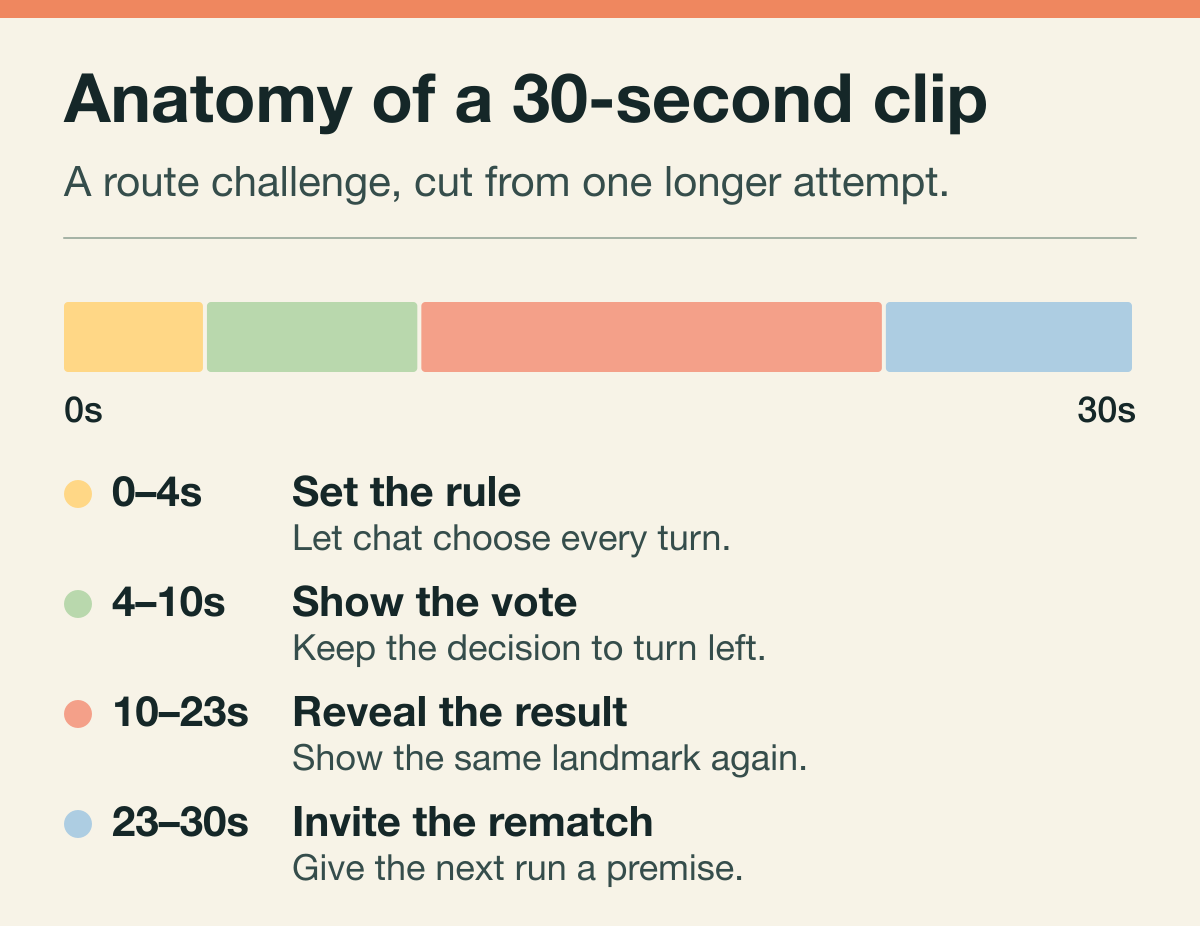
Seconds 0 to 4. Establish the rule. Open on the junction with the car stopped and leave in the words “You pick every turn until I reach the water.” Give the viewer a landmark they can recognize again, such as a striped awning. If the sentence begins over a menu, carry the audio across the first useful road frame. Check that the spoken line still describes the picture.
Seconds 4 to 10. Show the choice. Keep one vote and the beat where you commit to it. You can cut the rest of the waiting. If chat is outside the vertical crop, repeat the winning choice aloud or caption your own response: “Left it is.” You have now given someone watching on mute a way to understand who made the decision.
Seconds 10 to 23. Preserve the surprise. Keep enough of the turn to show that you followed the instruction, then cut to the awning coming back into view. Leave the pause before you recognize it. If you jump straight to the laugh, the viewer has to take your word for the joke. If the awning disappears in a center crop, use a wider fit for that moment and let the landmark occupy the frame.
Seconds 23 to 30. Earn the invitation. Let the laugh finish. A last line such as “Tomorrow chat gets one chance to get me out of this block” turns a complete joke into an invitation with a premise. Put the broadcast time and your channel name in the post copy. These timings are an edit to try. If the story lands in eighteen seconds, stop there.
Give the editor a brief it can actually use
A useful instruction names the line, the visual proof, and the material to leave out. For the example above, try “Find where I say you pick every turn. Keep my reaction when I recognize the street. Skip menu screens and stop before the mission dialogue.” Watch the storyboard you get back. StormClip can locate the spoken line. Only you can confirm that the landmark is visible, the subtitles spell the street name correctly, and the thumbnail gives away nothing from the story.
Save a second cut with a different opening only if it tests a real question. You might open with “Why are we back here?” and then show the vote. Play both cuts to someone who missed the stream and ask who picked the route. If the answer is unclear, save the straightforward version. A more mysterious opening costs too much when it hides the basic premise.
The workflow
- Give it the stream. Paste the YouTube link to your GTA 6 stream or VOD, or the link to your Kick VOD once the stream has ended. A Twitch VOD link works too. If you recorded locally, upload the file.
- Say what happened. One line is enough: "first six hours of GTA 6, clip my reactions and the funny chat moments, skip the menus and the loading". You can also say what to leave out.
- Let it listen. StormClip transcribes the full stream with word timing and scores it stretch by stretch for hooks, payoffs and lines people will quote.
- Review the picks. Every pick renders right away as a captioned vertical short. Check that both your reaction and the turn in the road stay in frame. Approve the ones you like, trim a start or an end, or reject it.
- Ask for more. Tell the clip agent "3 more clips from the heist" or "find where I talked about the map". It searches the transcript, so a moment you remember is one message away.
- Post. Each approved clip has its own file and its own title, caption and hashtags for each of nine platforms. StormClip posts to YouTube Shorts and Bluesky for you and hands you a ready kit for the rest.
Keep launch week spoiler free
Many of your viewers have not played yet. In the instructions, tell StormClip to stay away from story endings and big reveals ("no clips from the last mission, no character deaths"). The picker is given that as a rule, and a pick that clearly breaks it in what you said is dropped.
That check is a help, not a guarantee. It reads what is said, so it can miss a spoiler that is shown and not spoken, and it does not check titles. Watch every clip and read every title before you post. Check the opening thumbnail as well as the footage.
Find out whether the short brought anyone back
Publish the challenge before your next stream and the result afterward. Note which clip led to a channel visit or a new chatter who mentions the route. If the short has views but nobody recognizes the challenge when you go live, try a clearer invitation with the day, time and channel name.
Run a three-broadcast experiment
On the first broadcast, set the rule and ask viewers to pick the route. Publish the clearest attempt afterward. On the second, open at the same junction and give chat a different constraint, such as reaching the water without using the main road. When somebody mentions the first clip, note what they remembered. On the third, lead with that detail and let chat choose the next constraint.
After each broadcast write down the clip you posted, where you posted it, the next live time you advertised and any sign that somebody followed the invitation. A comment asking for the next route is a different outcome from somebody arriving live and casting a vote. Keep those observations separate. If people are quoting the joke but asking where to watch, make the channel easier to find. If they turn up expecting a driving challenge, start with the promised challenge before moving on to missions. That closes the loop for the person who gave the stream a chance.
What a GTA 6 stream costs
1 credit is 1 minute of stream, however many clips come out of it. Kick and Twitch streams and VODs, and uploads are 50% off: 1 credit is 2 minutes. The Free plan ($0, no card needed) covers a first window, not a whole night: give a start and an end time and only that stretch is read and charged, so pick the part you remember being good.
After that, Monthly is $29 per month for 1,800 credits, or a pack is $9 for 360 credits and does not expire. A six hour stream is 360 credits from a YouTube link, and 180 as a Kick VOD or an upload.
What it does not do
StormClip picks from what is said. It does not watch the game, so it will not find a clean getaway or a five star chase by itself unless you were talking through it. If you play mostly in silence, a tool that detects in-game events will find more. See StormClip vs Eklipse. It also transcribes English only.
Your stream, your clips
Clip your own streams, or streams you have the creator's permission to clip. The clips are yours to post.
StormClip is not affiliated with Rockstar Games or Take-Two Interactive. Grand Theft Auto is their trademark, and what you may post from the game is set by Rockstar's policy on posting copyrighted material. Read it before you post, in particular the parts on spoilers and cutscenes.
Browse all guides →