A clipping workflow for people who clip other creators
If you are paid to clip someone else's streams, StormClip finds the moments, renders per platform and writes the copy, so you spend your time choosing.


If you clip for a creator, or run clip channels for a few of them, your pay follows output: clips posted and views earned. The slow parts are watching hours of stream, exporting one file per app and writing a caption for each. StormClip takes those three, and leaves you the part that needs taste.
Agree on what approval covers
Ask the creator for an example they would repost, their credit line and the accounts allowed to publish. Deliver one candidate with a timestamp and a suggested caption. A quick “keep the joke, cut the sponsor read” on that first pass can save a dozen exports later.
The workflow
- Start from the VOD. Paste the YouTube link the moment a stream ends. There is nothing to download first.
- Give it the brief you were given. Most creators and campaigns have rules: topics to push, things never to post. Put them in the instructions ("only the Q and A, nothing about the sponsor, no clips with swearing"). Picks are checked against them and a clear break is dropped.
- Work the shortlist. You get ranked picks, each already rendered with captions. Approve, reject, trim. Reading what is said in each clip is faster than watching all of them.
- Go back for more. Ask the clip agent for "5 more about the tournament" or search the transcript for a moment the creator mentioned.
- Deliver per platform. Each clip has a file and copy for each of nine platforms, cut to each one's length cap. Download them, or hand the creator the kit.
Why this suits paid clipping
Cost follows the stream. 1 credit is 1 minute of source, so a 2 hour VOD costs 120 credits whether you take 5 clips or 25. Kick and Twitch streams and VODs, and uploads are 50% off: 1 credit is 2 minutes, so the same VOD from Kick costs 60. A re-render after an edit is 1 credit.
No subscription needed. Packs start at $9 for 360 credits and do not expire, which fits work that comes in bursts. Monthly is $29 per month for 1,800 credits if you clip every week.
It can run without you. With the CLI, stormclip clip <link> --count 10 --out clips starts a job and saves every finished clip with its copy as a text file next to it. With the MCP server, an agent can do the same and report back.
The numbers are public. Length caps, frames and caption limits for each app are in the platform specs, so you can tell a client what they will get.
Before you start
- Clip only what you have the right to clip. Get the creator's permission or work inside a clipping program's rules.
- StormClip posts to YouTube Shorts and Bluesky from a connected account. TikTok, Reels and the rest are a ready file and copy that you upload.
- It transcribes English, and it picks from speech, not from on-screen action.
Turn “looks good” into an actionable approval
Imagine that a creator sends you a two-hour stream and asks for a vertical post before tomorrow's broadcast. Agree on the destination before cutting. A creator approving a Reel on their own account has answered a different question from a creator approving a repost by a partner account. Write down the destination, who will publish it, the credit line and any material that must stay out.
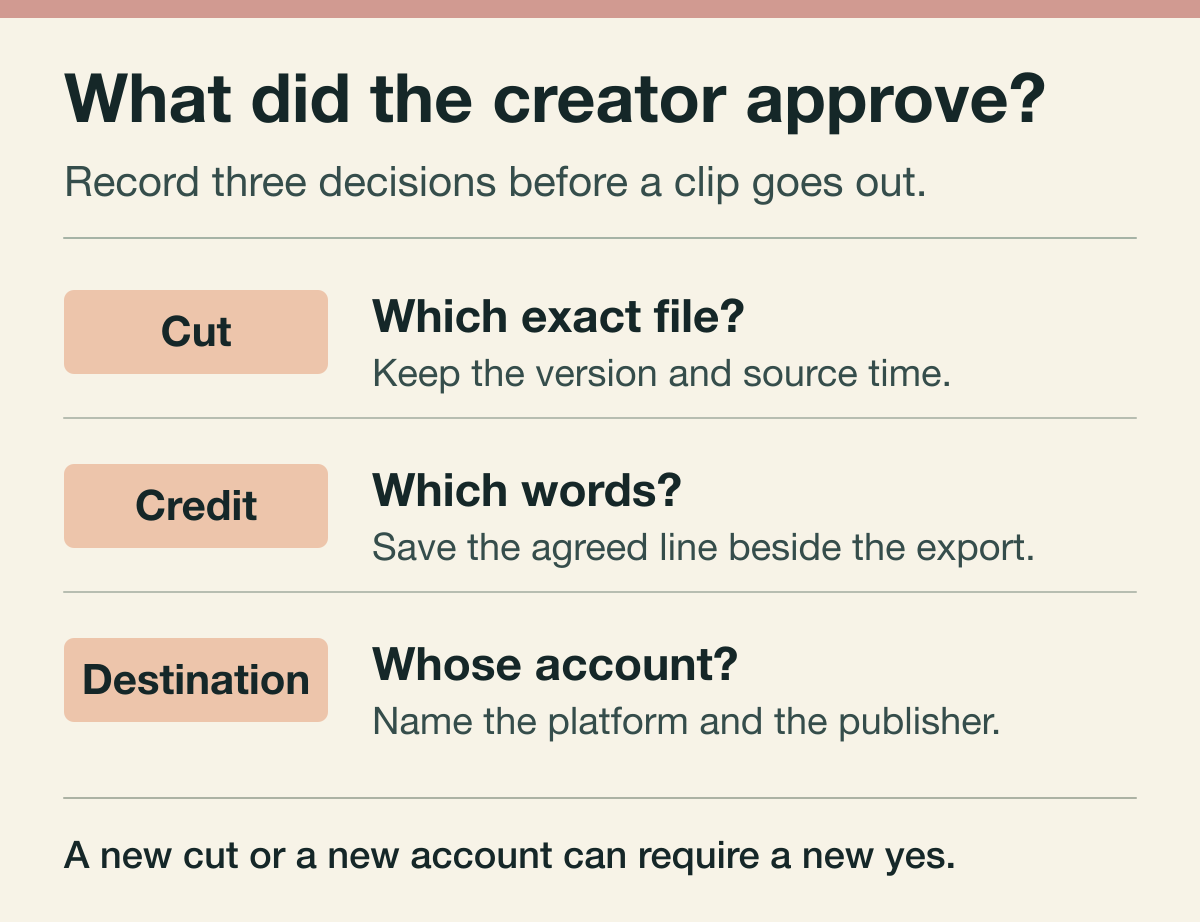
Deliver one candidate as a decision. Include the source timestamp, the export, the first line of the post, and a sentence such as “I kept the setup and the reaction; the sponsor read begins immediately afterward and is outside this cut.” Ask the creator to approve the cut, the wording and the named destination. This makes it possible to change one part without reopening all three.
Handle a revision without losing the approved version
Suppose the creator replies, “Great clip, please credit the viewer who suggested it.” Keep the video version and update the post copy if that is where they want the credit. If they ask for the name inside the video, make a new export and check it at phone size. Send back the changed item and say exactly where the credit now appears.
When the clip goes out, record the posted URL beside the approved file and wording. If a second account asks to use it, check the original permission before you hand over the file. A private delivery link belongs with the creator. A shareable clip and its agreed credit line are enough for an approved partner. That distinction lets you give a client a clear record of where their work went.
Browse all guides →